Guides, courses and tracking in one place
Document the work. Train the team.
Record any task and SOPpal writes the step-by-step guide. Turn guides into courses with quizzes, XP and reminder emails, and see who has finished. Ready-made training for eleven trades included, from HVAC and roofing to pest control, pool service and solar.
Takes about a minute. No credit card. Cancel any time.
- No sign-up for the demo
- 14-day free trial on paid plans
- Chrome and Windows recorders
From sign-up to a trained crew in three steps
Create your free account
Your name and email. That is it. Add your company name whenever you like.
Pick your trade
SOPpal sets up your job roles and adds a starter set of courses, with due dates.
Add your crew
Paste a list of names and emails. Everyone gets an invite and a clear first task.
No credit card needed
See it in action
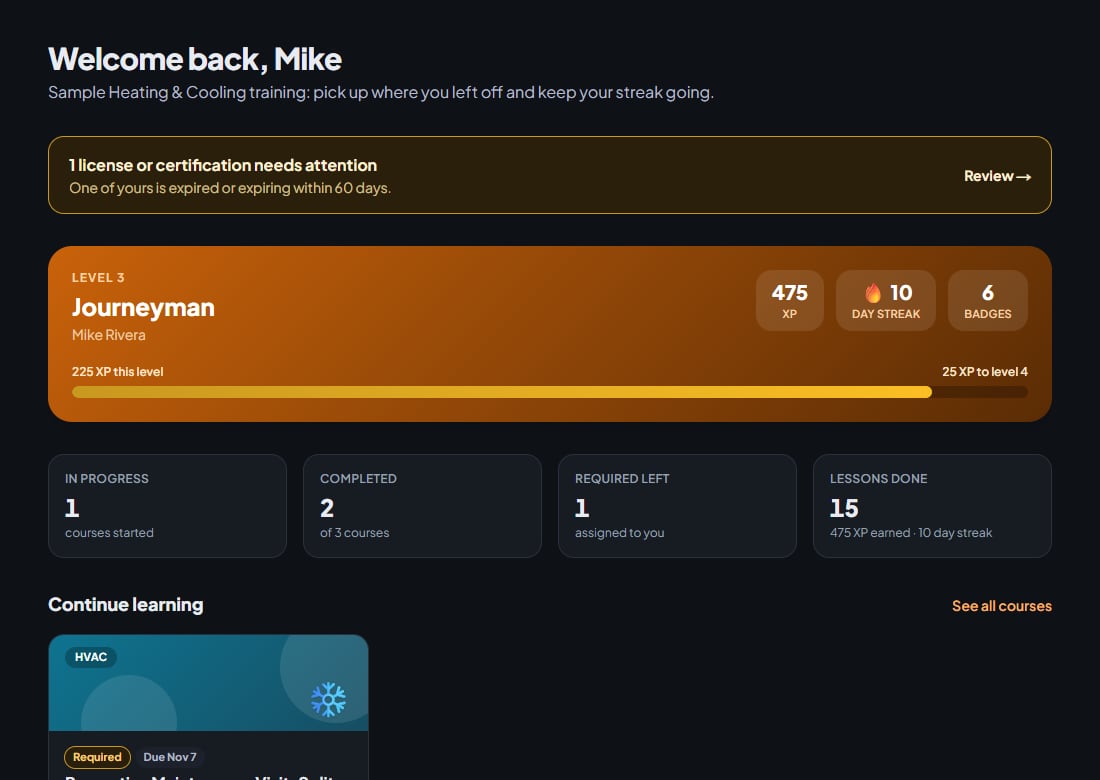
What your team and your training records look like
These are real screens from a sample HVAC company. Open it yourself and click around: no sign-up, no card.
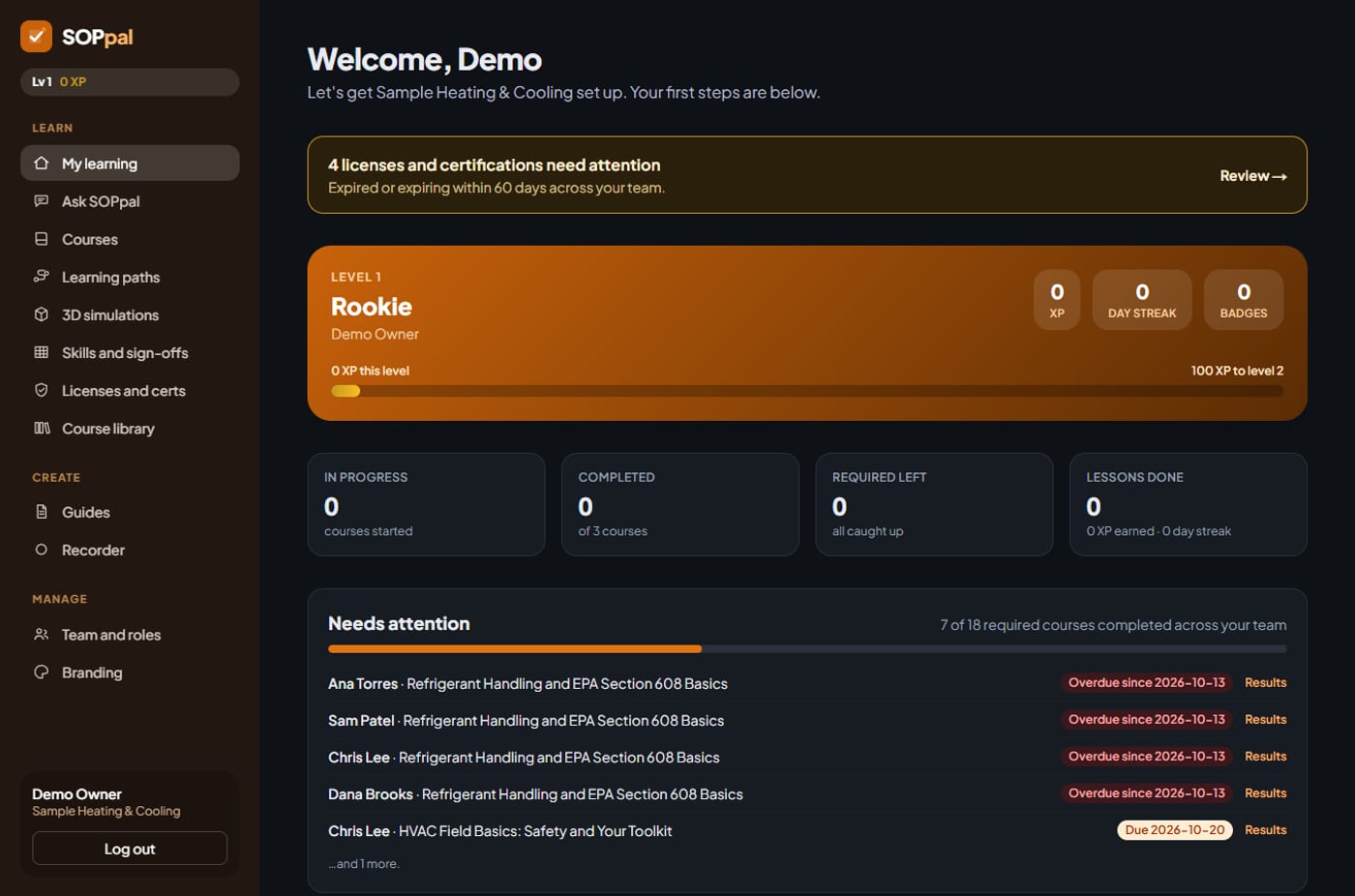
See who is overdue at a glance
Your home page shows how many required courses are done across the team, and exactly who needs a nudge.
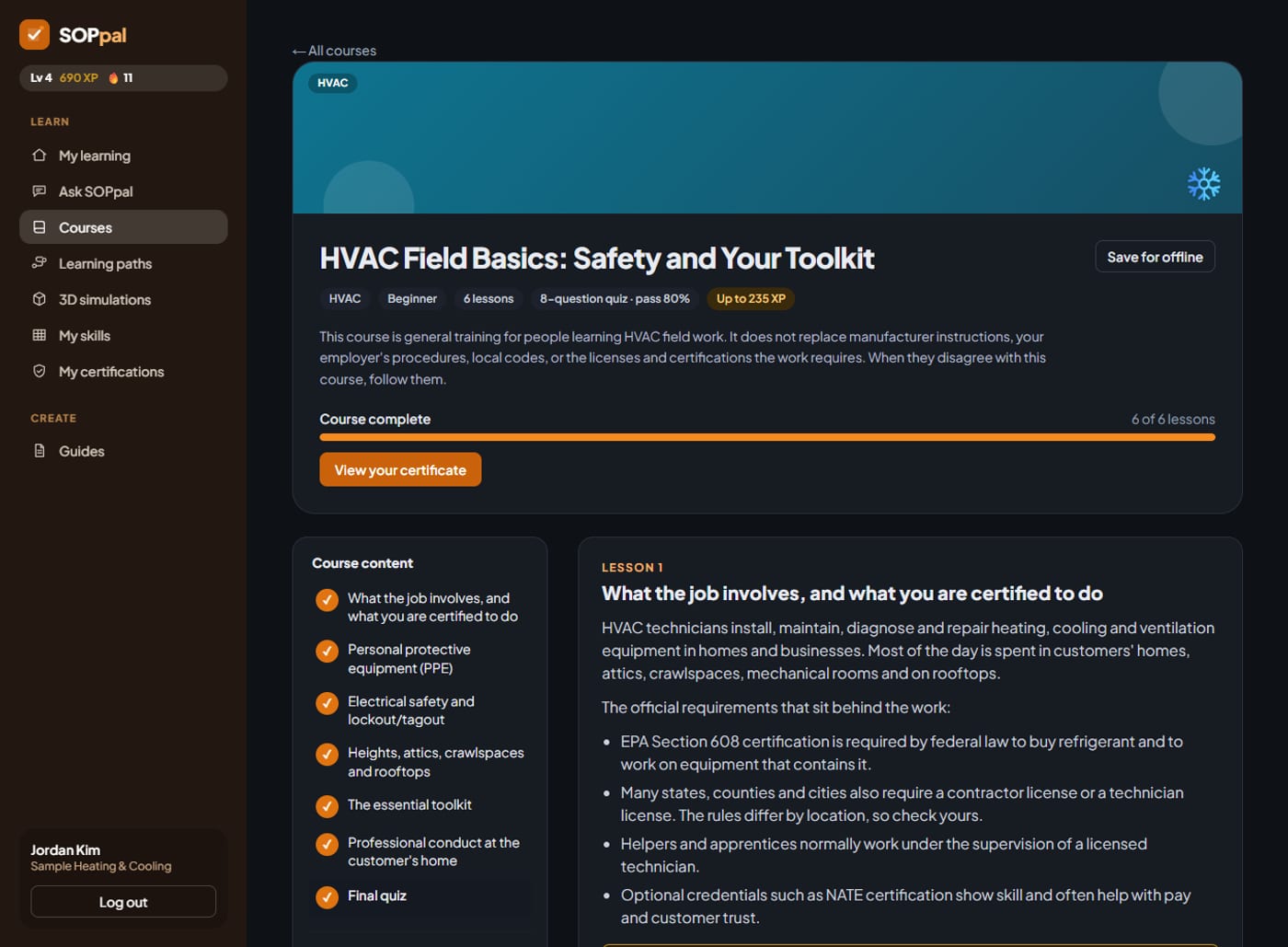
Lessons, tools and a quiz in one place
Short lessons, the tools each job needs, and a final quiz. Progress and a certificate come built in.
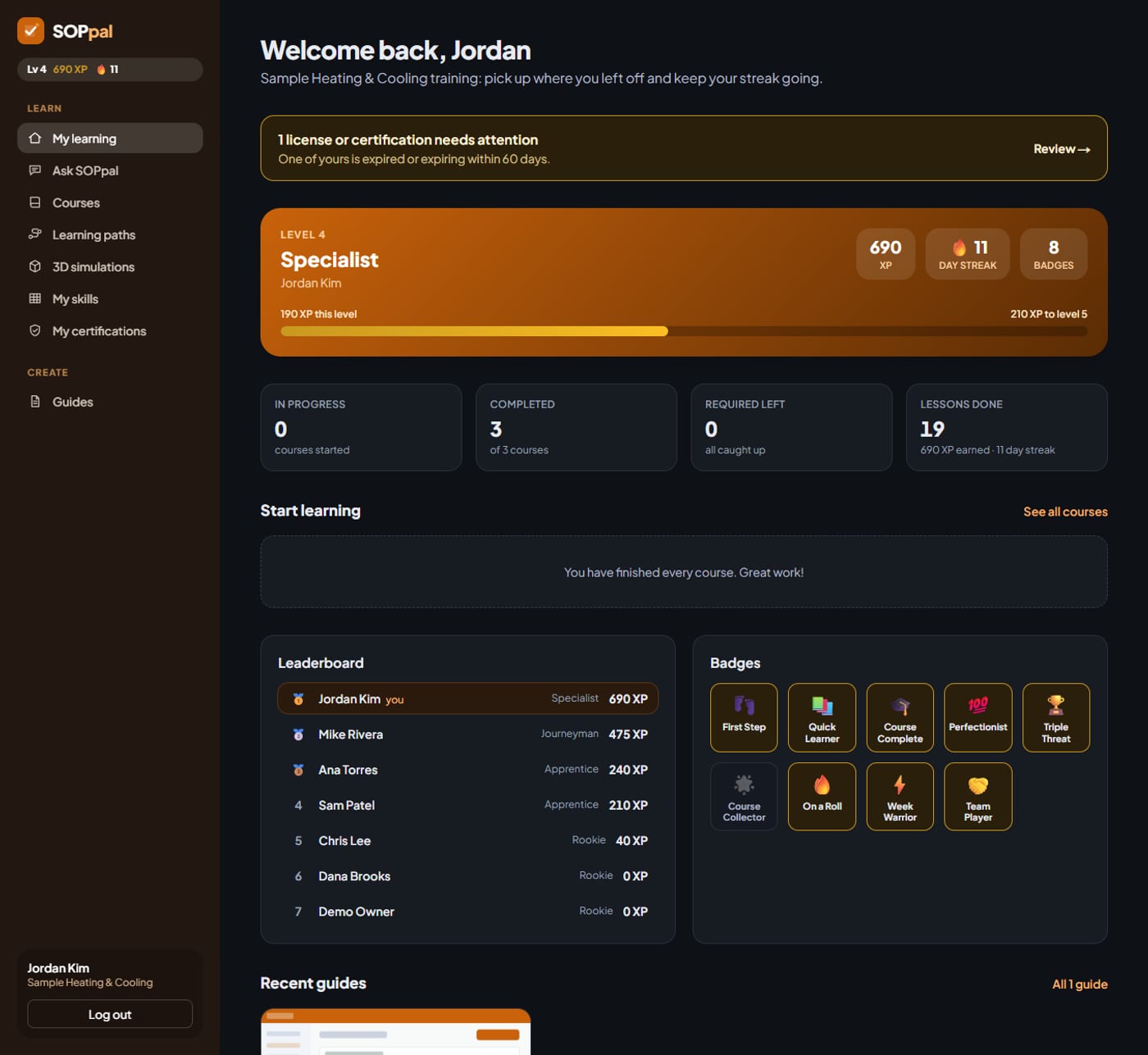
Training people actually finish
XP, levels, daily streaks, badges and a team leaderboard keep a crew coming back to the next lesson.
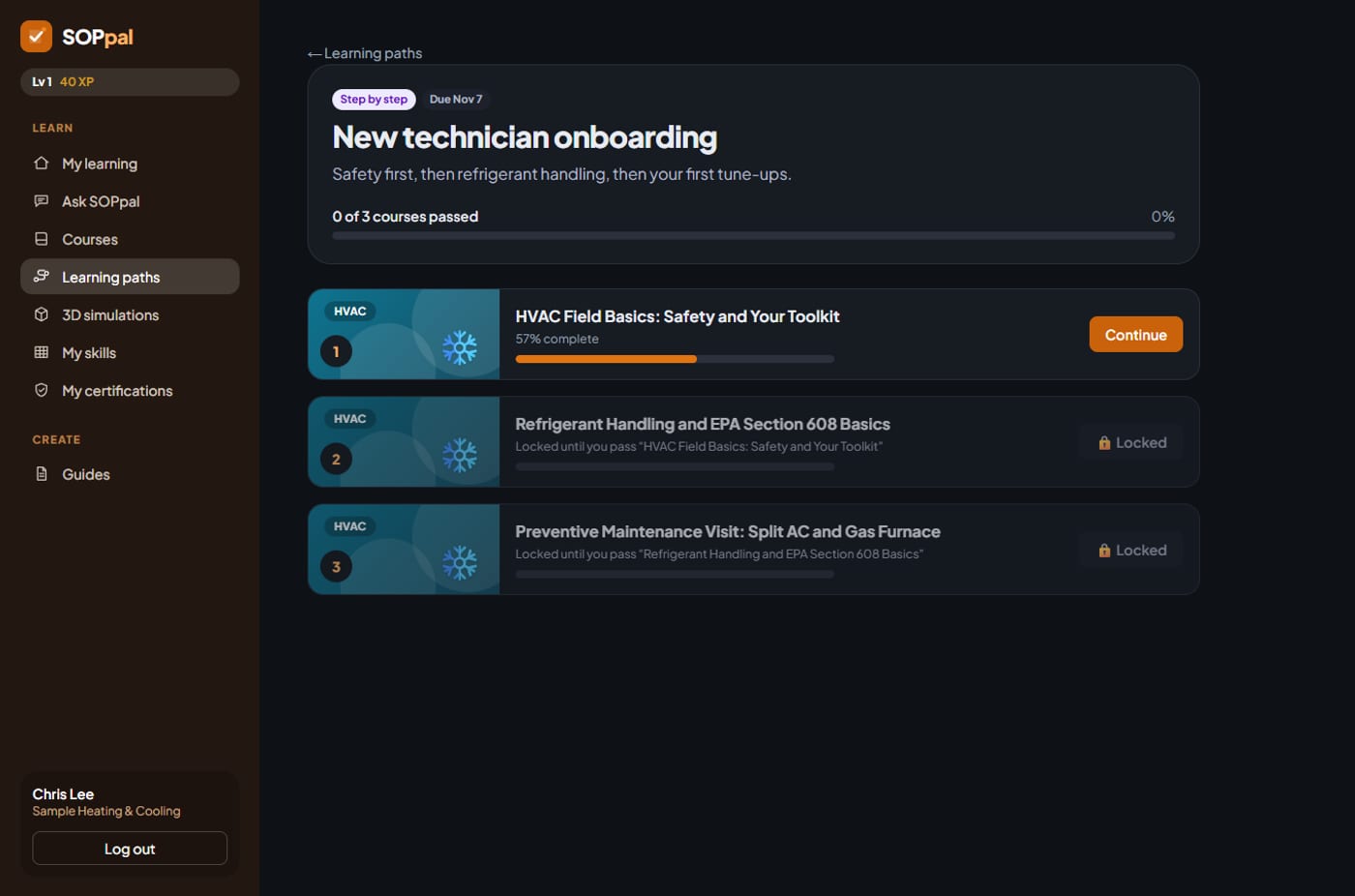
Learning paths that unlock step by step
Put courses in order for a job role, like a new technician's first month. Each one opens when the last is passed.
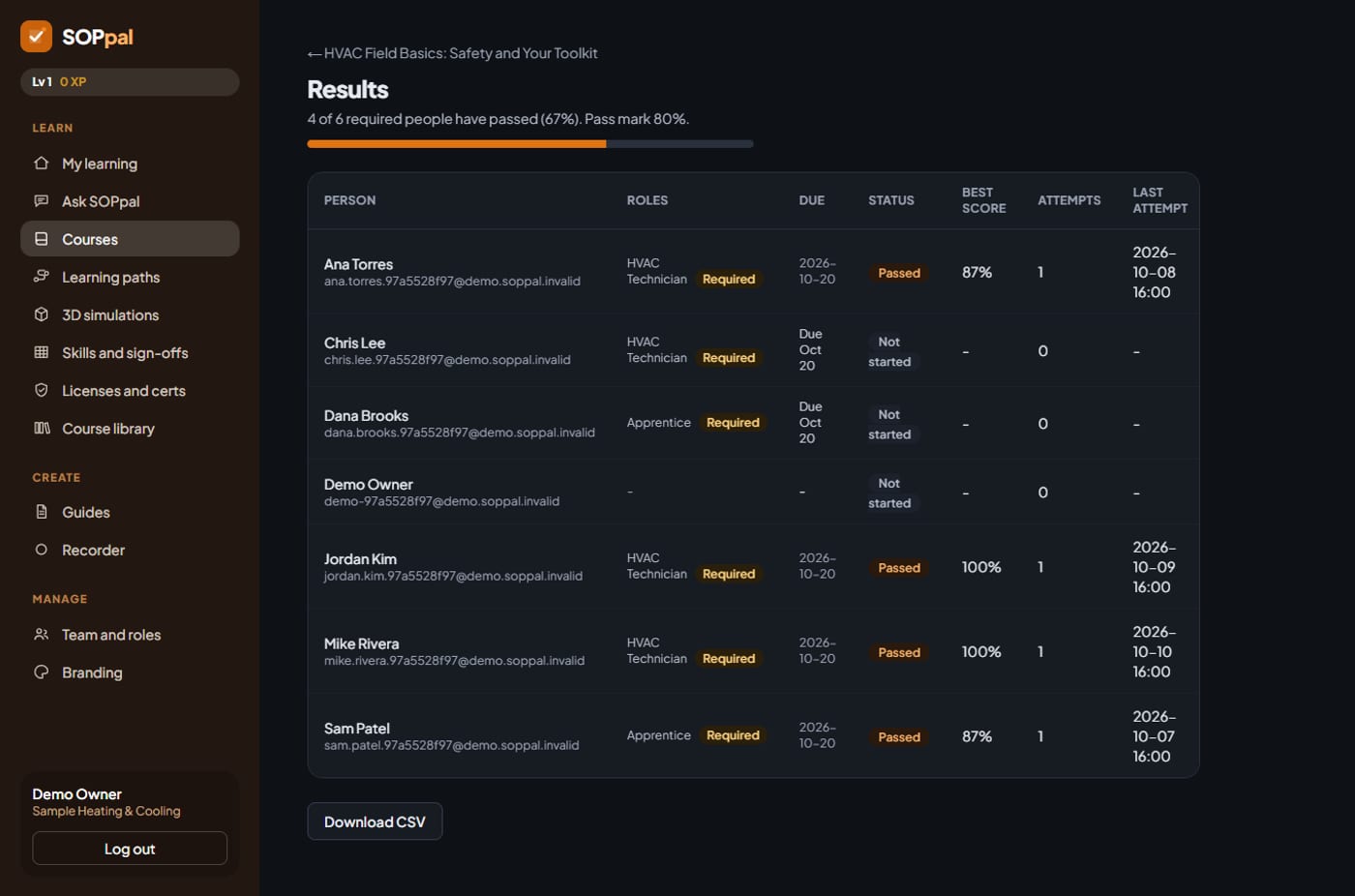
Results you can show anyone
Every person's status, best score and due date, with a spreadsheet download for your records.
Try it with your own crew in mind
Open the sample company, finish a lesson, and see your XP and the leaderboard move.
Try a sample companyOr create your free accountScreenshots show a sample company with made-up people and data.
Training library
Ready-made training for your trade
63 courses across eleven trades. Add one in a click, edit it to match your company, and assign it by job role.
HVAC
5 courses · 31 lessons
- Safety and Your Toolkit
- Refrigerant Handling and EPA Section 608 Basics
- Split AC and Gas Furnace
- Troubleshooting a No-Cooling Call
Plumbing
5 courses · 30 lessons
- Safety and Your Toolkit
- Materials, Joints and Pressure
- Drain, Waste and Vent (DWV) Systems
- Install, Repair and Maintain
Electrical
5 courses · 29 lessons
- Safety and Your Toolkit
- Electrical Theory and Using Your Meter
- Cable, Conduit and Boxes
- Circuits, Devices and Panels (Residential)
Roofing
5 courses · 31 lessons
- Safety and Your Toolkit
- Roof Systems and Materials
- Installing Asphalt Shingles
- Flashing and Leak Diagnosis
Pest Control
7 courses · 28 lessons
- Safety, Labels and Your Toolkit
- Identification and Biology
- Inspections and Integrated Pest Management
- Pesticide Types and Application Methods
Landscaping
6 courses · 23 lessons
- Safety and Equipment
- Mowing, Feeding and Weeds
- Operation and Troubleshooting
- Planting, Pruning and Bed Maintenance
Pool Service
6 courses · 22 lessons
- Safety and Chemical Handling
- Water Testing and Balance
- Pumps, Filters and Circulation
- Weekly Service Visits and Problem Pools
Garage Door
6 courses · 23 lessons
- Safety and Tools
- How a Garage Door System Works
- Diagnosing and Repairing Common Problems
- Tune-Ups, Safety Tests and Customer Service
Appliance Repair
6 courses · 23 lessons
- Safety and Tools
- Diagnosing Appliances with a Meter and Manual
- Washers, Dryers and Dishwashers
- Ranges, Ovens and Refrigerators
Cleaning
6 courses · 22 lessons
- Chemical and Personal Safety
- Cleaning Methods, Disinfecting and Surfaces
- Restrooms, Kitchens and Floor Care
- Window Cleaning, Walkthroughs and Customer Trust
Solar
6 courses · 22 lessons
- Electrical and Roof Safety
- How a Home Solar System Works
- Installing a Rooftop System
- Troubleshooting, Monitoring and Customer Conversations
New · 3D simulations
Show your crew what is happening inside the equipment
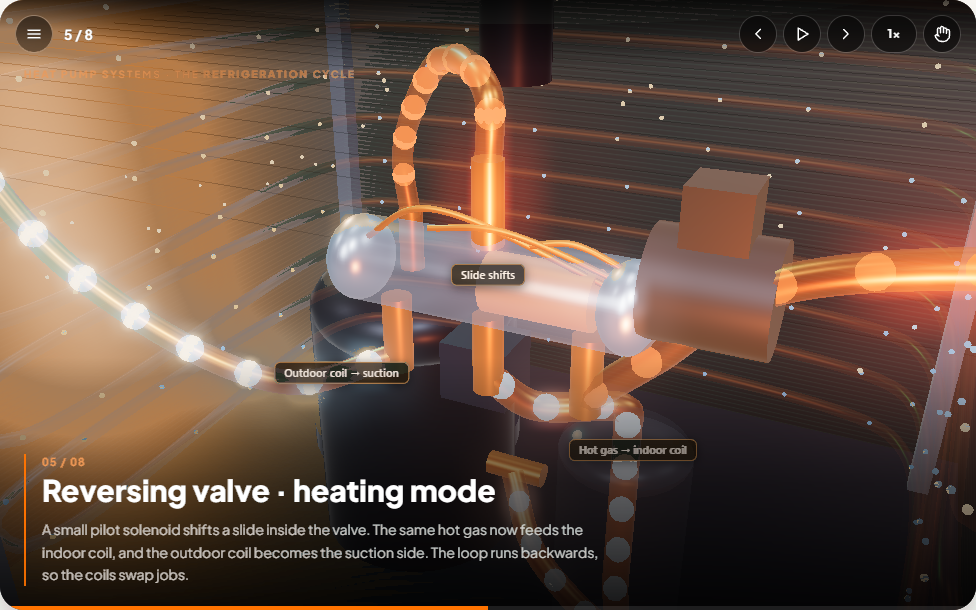
Animated, explorable 3D models of thirteen systems across eleven trades, each walking through how it works one scene at a time. Pause, speed up, or orbit the model yourself. Finishing one earns XP and links to the course behind it.
Hands-on practice
Technicians do the job, not just watch it
Every simulation has a practice task. Click the right part in the 3D model, make the safety calls, and get instant feedback with hints and a star score. For example: lock out and prove a circuit dead, follow the refrigerant in a heat pump, flush a water heater, or fix a gurgling sink.
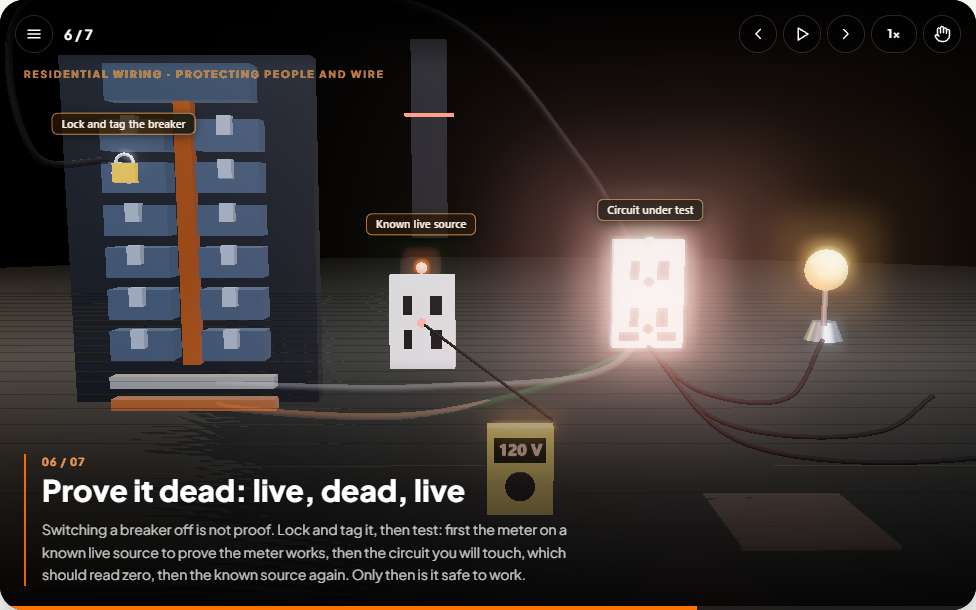
Circuit protection
Overloads, shorts and GFCIs. Practice: lock out and prove a circuit dead.
Try it free →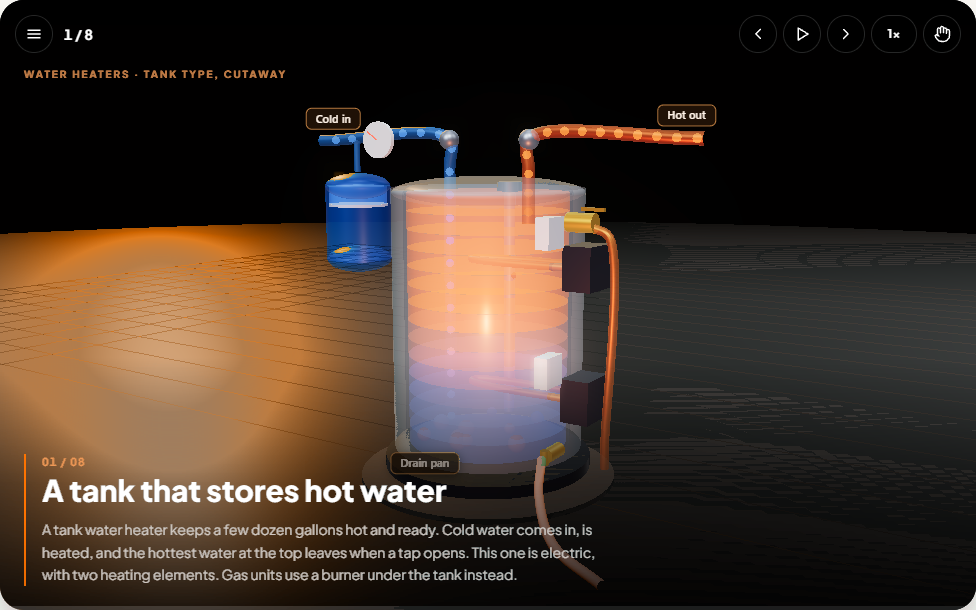
Water heater
The anode rod, relief valve and flushing. Practice: an annual service.
See it in the demo →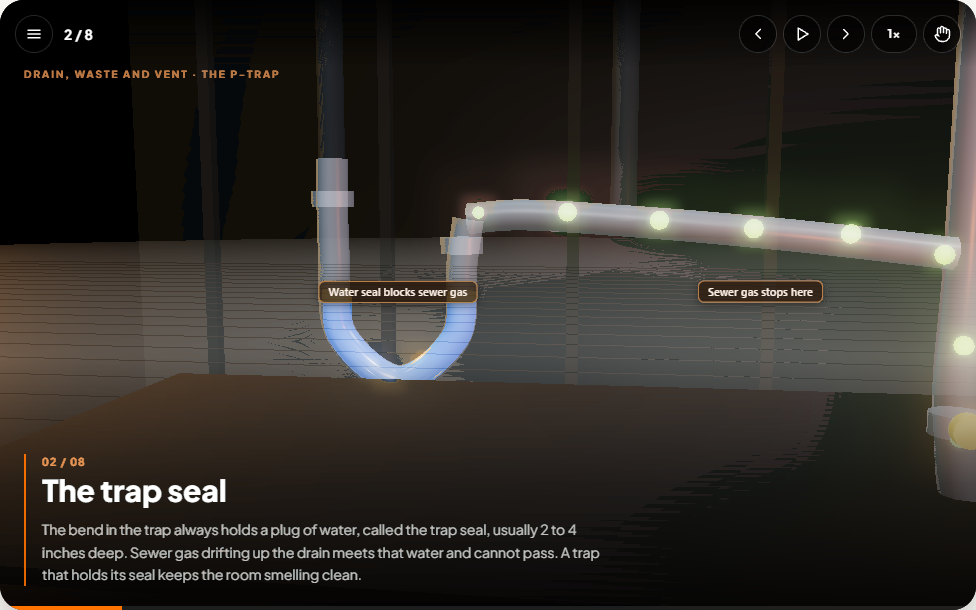
Traps and vents
Why drains gurgle and how a water seal works. Practice: fix a gurgling sink.
Try it free →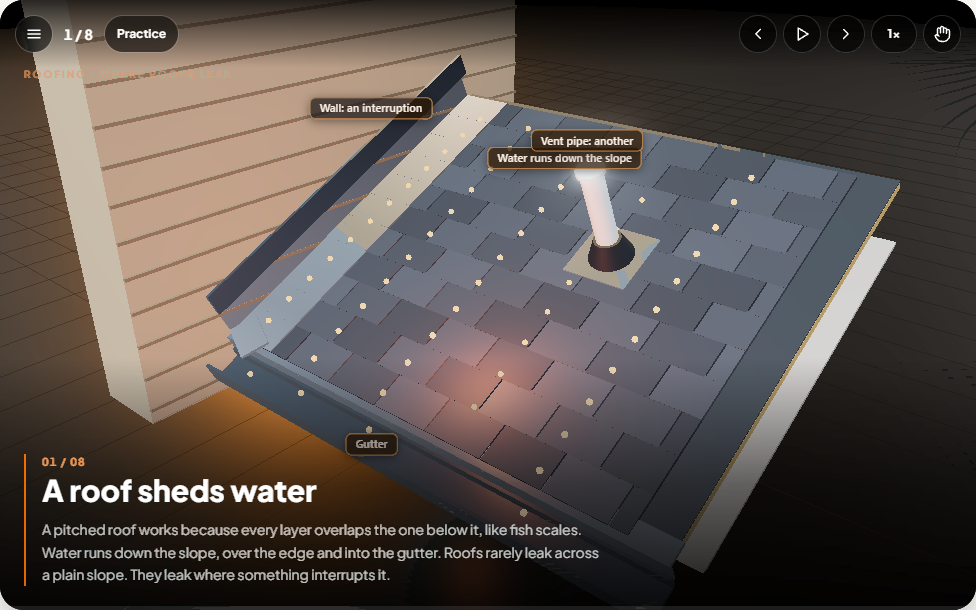
Roof flashing
Layers, step flashing and what a leak does inside. Practice: flash a roof-to-wall joint.
Try it free →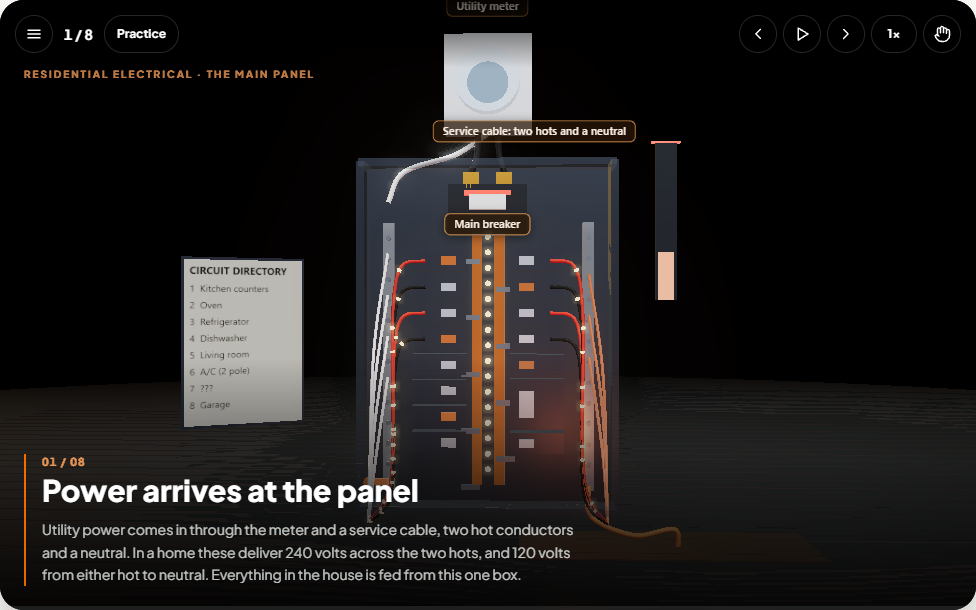
Service panel
Meter, main breaker, bus bars and why the main off is not dead. Practice: a panel walkthrough.
See it in the demo →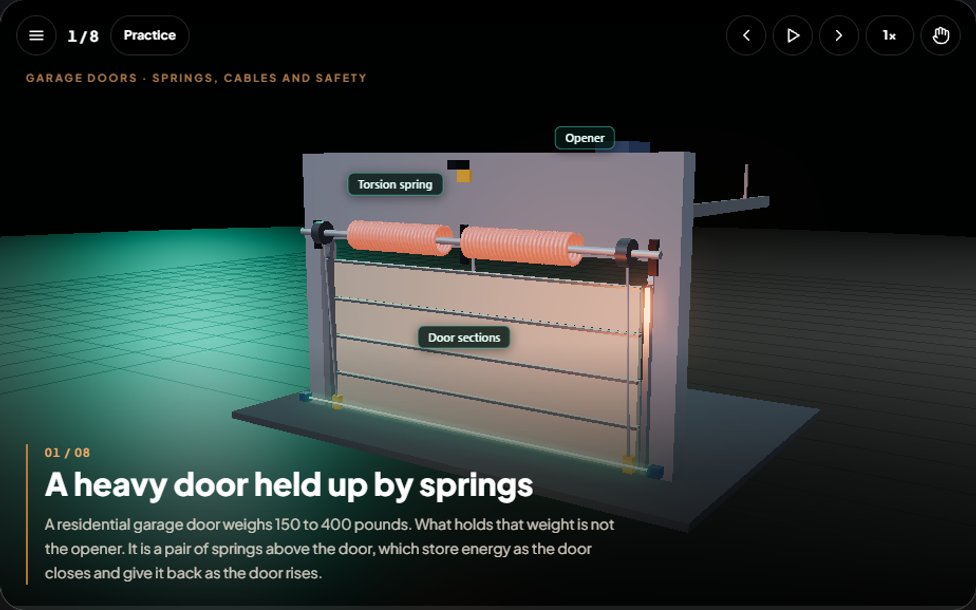
Garage door springs
What really holds the door up, and why springs are never touched untrained. Practice: a door that will not open.
Try it free →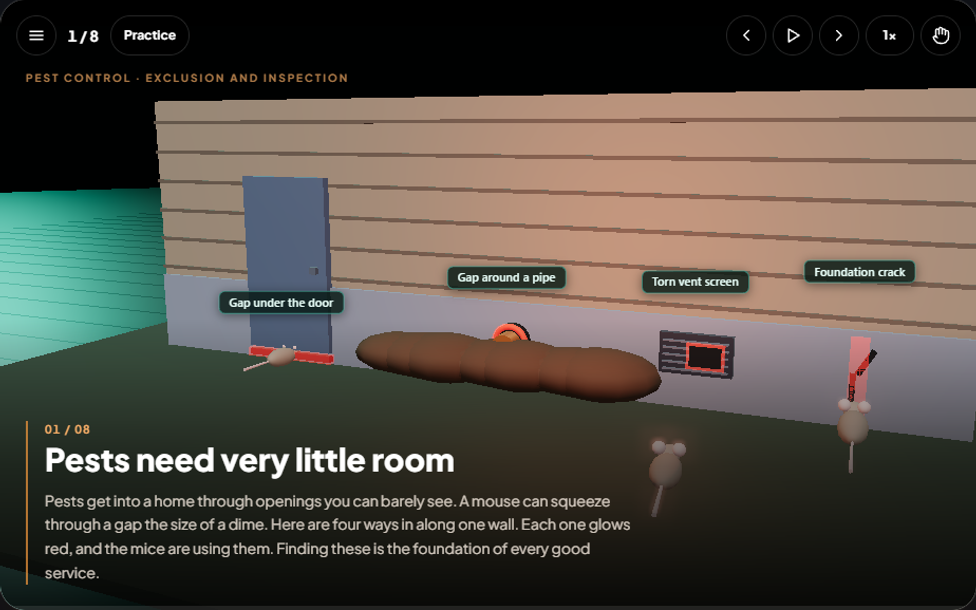
Pest entry points
Find the door gap, pipe gap, torn screen and crack, then seal them. Practice: seal the home.
Try it free →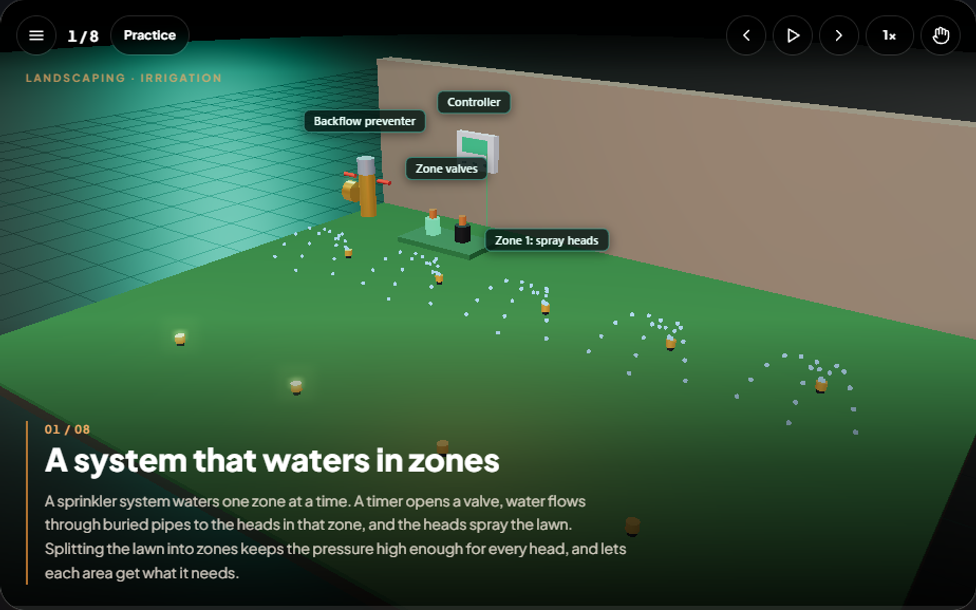
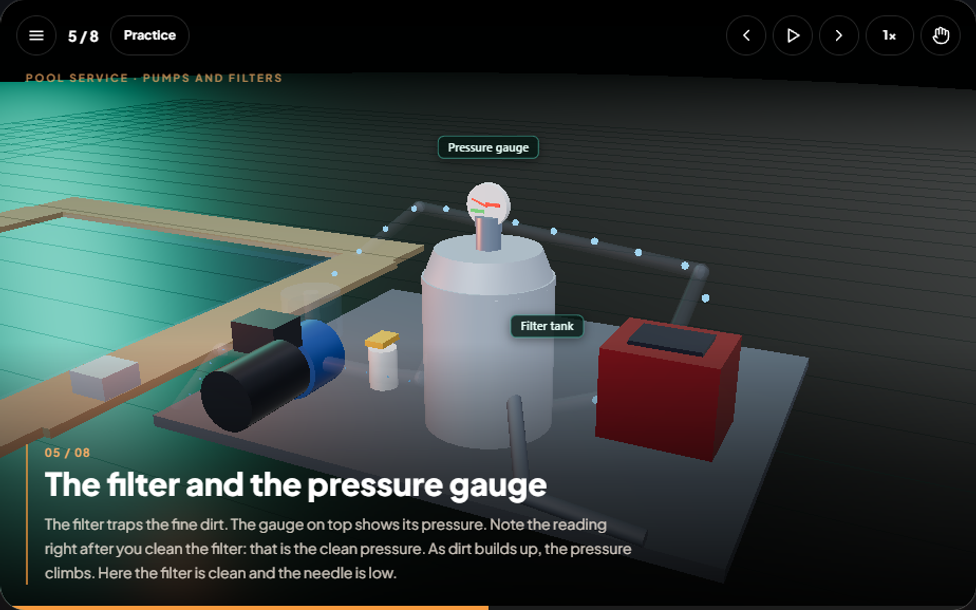
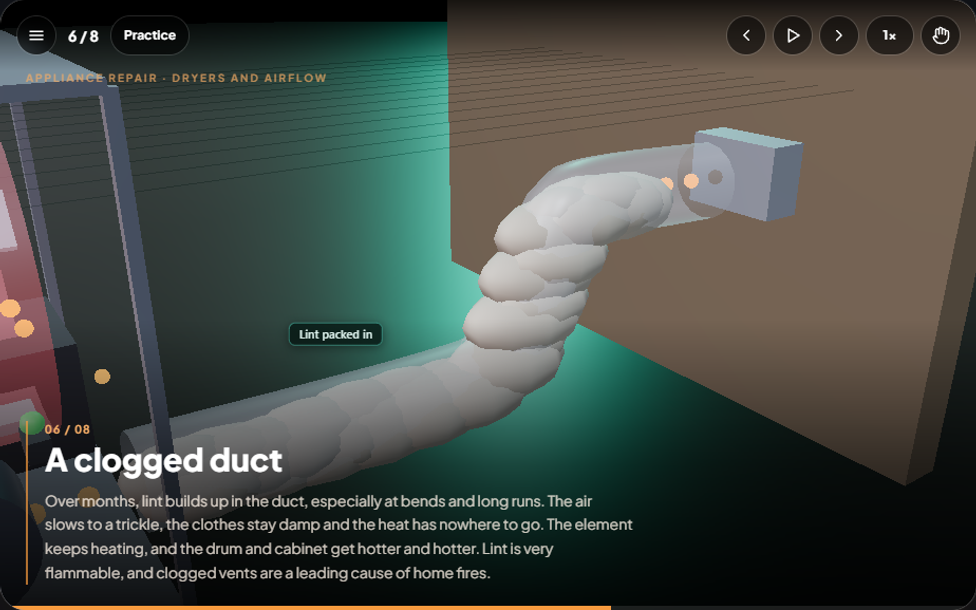
Dryer vents
Why a clogged vent blows the thermal fuse and starts fires. Practice: the dryer that takes two hours.
Try it free →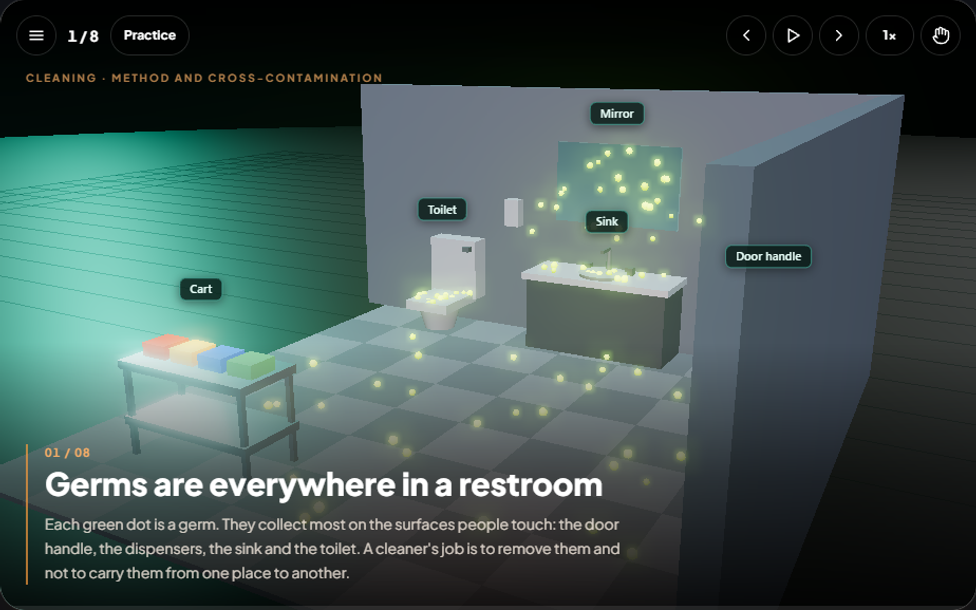
Restroom cleaning
Germs, order, dwell time and color-coded cloths. Practice: clean a restroom to standard.
Try it free →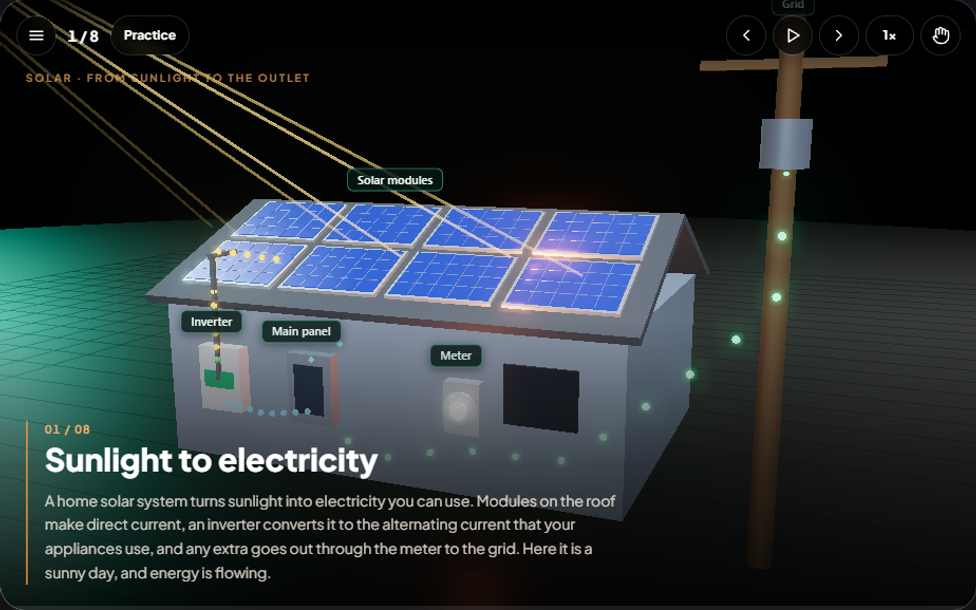
Home solar
Modules, inverter, panel, meter and grid, including outages. Practice: a solar service call.
Try it free →Your trade next?
Tell us which system or procedure your crew struggles to picture, and we will build it.
Request a simulation →
Included with the training plans. Free samples need only your name, email and phone. New simulations are added regularly.
From task to guide in three steps
- 1
Capture
Click the SOPpal recorder, name your guide and do the task. No scripting, no narration.
- 2
Edit
Review the steps SOPpal wrote. Rename them, add highlights and blur anything sensitive.
- 3
Share
Copy a link, present it as slides, or export it. Your team always sees the latest version.
The SOPpal recorder is on the Chrome Web Store
Add it to Chrome in one click, then record any website task as a guide. A Windows recorder is available for desktop programs.
Capture
Just do the task. SOPpal writes it down.
Start the recorder and work like you normally would. Every click becomes a step with a screenshot, a title and a highlight on exactly what you clicked.
- Steps named for you, like Click “Save” or Type in the “Email” field
- Works on any website with the Chrome recorder
- Record your whole screen to capture desktop programs too
Edit
Edit it like a document. Hide what’s private.
Rename steps, reorder them and switch highlight styles. Blur or black out anything sensitive, crop a screenshot, or add a text label. Edits are baked into the picture.
- Password fields blurred automatically while you record
- One switch to blur every text field
- Six highlight styles, in your brand color
Share
Send a link, present slides, or export a file.
Share a guide with one link that works without an account, present it full screen, or download it as a PDF, Word document, PowerPoint or a single web page.
- Turn the link off any time and it stops working instantly
- Your logo and colors on every export
- Everyone on your team finds the latest version in one place
Onboarding
Set up your work email
8 steps
Anyone with this link can view the guide
Highlights
Six ways to say “click here”
Pick a style before you record or change it later, for one step or the whole guide. They all follow your brand color.
A guide for every “how do I…?”
Onboarding
Show every new hire exactly how to set up their tools and do their first week of work.
Customer support
Answer how-do-I questions once and send the guide instead of typing it out again.
IT and helpdesk
Walk people through resets, access requests and setup without a screen share.
Training
Turn the way your best people work into guides everyone can follow.
Sales and operations
Document the CRM, quoting and handoff steps so nothing lives in someone’s head.
Compliance and audits
Keep dated, versioned records of how a process is meant to be done.
Team workspace
Add teammates so everyone works from the same library of guides.
Your branding
Add your logo and pick a brand color for shared pages, slides and exports.
Private until you share
Guides are visible to your team only, until you create a link.
Versioned
Edit a guide any time. Each save is a new version, so you always know what changed.
The platform
From documenting the work to training the team
Start with guides. Add courses and tracking as your team grows. Each plan includes more of the platform.
Guides
LiveAll plans
Record any task and get a step-by-step guide with screenshots.
- Chrome and Windows recorders
- Automatic step names, password blur
- Share links, slideshows, PDF, Word and PowerPoint exports
- Your logo and brand color
Courses and tracking
LiveTraining
Turn a guide into a lesson with a quiz, then see who has finished.
- Starter quiz questions written from your steps
- Pass marks, retakes and answer explanations
- Job roles: require courses for the right people
- Per-person completion status and CSV reports
Gamified learning
LiveTraining
Learning that people actually finish: points, levels and friendly competition.
- XP for every lesson and quiz, with levels from Rookie to Master
- Daily streaks and achievement badges
- Team leaderboard
- Printable certificates when a course is passed
3D simulations and practice
LiveTraining
Animated, explorable models of real equipment, with hands-on tasks your techs complete.
- Thirteen systems across eleven trades, from heat pumps and circuits to garage door springs, pool pumps, dryer vents and solar
- Click the right part and make the safety calls, with hints and feedback
- Star scores and XP for finishing tasks
- Each simulation links to the courses it supports
Setup help
LiveTraining
A real person helps you get your first processes captured.
- Priority support
- Help turning your processes into guides and courses
Training library
LiveTraining
Ready-made courses you add in one click and edit to match your company.
- HVAC: safety, refrigerant handling, maintenance, troubleshooting, measurements
- Plumbing: safety, supply piping, drains and venting, fixtures and water heaters, leaks and clogs
- Electrical: safety, theory and meters, wiring methods, circuits and panels, troubleshooting
- Roofing: safety, materials, shingle installation, flashing and leaks, inspections and estimating
- Pest control: safety and labels, identification, inspections and IPM, treatments, customer records
- Landscaping: safety and equipment, lawn care, irrigation, planting and pruning
- Pool service: chemical safety, water balance, pumps and filters, weekly service and problem pools
- Garage door service: spring safety, how doors work, repairs, tune-ups and safety tests
- Appliance repair: safety, diagnostics with a meter, laundry and dish, ranges and refrigerators
- Cleaning: chemical safety, methods and surfaces, restrooms and floors, windows and customers
- Solar: electrical and roof safety, how systems work, installing, troubleshooting
- Each lesson lists the tools needed
- More trades are added regularly
Ask SOPpal
LiveTraining
A technician asks a question in plain words and gets the answer from your own guides and courses.
- Answers come only from your material, with links to the source
- If your training does not cover it, it says so
- Owners see what the crew asked, so they know which guides to write next
- Print QR labels so a scan on the equipment opens its guide
Skills, sign-offs and licenses
LiveTraining
Know who can do what, and when their licenses expire.
- A supervisor signs people off on hands-on skills
- A team grid shows who knows it (course) and who can do it (sign-off)
- Track EPA 608, state licenses and OSHA cards with expiry reminders
- See where the team is thin
Simple pricing that grows with your team
Start free with two guides. Pick the plan that fits: every paid plan has a 14-day free trial and one price for your whole team, with no limit on people.
Free
Try it out
$0
Free forever
- Up to 2 guides
- Up to 5 people
- Browser recorder with auto-naming
- Password fields blurred automatically
- Share links and slideshow
Guides
Document the work
$39/month
or $390 a year
- Everything in Free
- Unlimited people
- Unlimited guides
- Windows and browser recorders
- Screenshot editor: blur, crop, text
- Export to PDF, Word, PowerPoint and web page
- Your logo and brand color
Training
Most popularDocument the work. Train the team.
$99/month
or $990 a year
- Everything in Guides
- Interactive 3D simulations with hands-on practice tasks
- Ask SOPpal: answers from your own guides and courses
- Skills sign-offs and license tracking with expiry reminders
- QR labels to stick on equipment
- Courses: turn any guide into a lesson and quiz
- Training library: 63 ready-made courses across eleven trades, from HVAC and roofing to pest control, pool, appliance and solar
- Gamified learning: XP, levels, streaks, badges and a leaderboard
- Job roles, assignments, due dates and reminder emails
- Completion tracking, certificates and CSV reports
- Priority support and setup help
- +More trade libraries and simulations Soon
Every paid plan covers your whole team, with no limit on people. Save two months with yearly billing. Questions? Contact us.
Questions
Can I try it before signing up?
Yes. Open the sample company from the demo page: a made-up HVAC company with a crew, courses, progress and a leaderboard. No sign-up or card, and it disappears after a day.
What are the 3D simulations?
Animated, explorable 3D models that show how a system works from the inside: a heat pump, a water heater, a drain trap and vent, circuit protection, roof flashing, a service panel, a garage door spring system, pest entry points, a lawn sprinkler system, pool circulation, a dryer vent, a restroom clean and a rooftop solar system. Technicians step through scenes or orbit the model themselves, then practice the job: click the right parts and make the safety calls with feedback and a score. Finishing earns XP. The sample company in the demo includes them, and a free sample runs at soppal.com/sim/heat-pump.
What is in the course library?
63 ready-made courses across eleven trades, from HVAC, plumbing, electrical and roofing to pest control, landscaping, pool service, garage doors, appliance repair, cleaning and solar: safety, tools, procedures and troubleshooting, each with lessons, a tools list and a quiz. Add one in a click and edit it to match your company.
Does finishing a course certify someone?
No. Courses are general training and do not replace licenses, certifications such as EPA 608, building codes or manufacturer instructions. SOPpal records who completed your training and gives them a certificate of completion.
How do reminders and tracking work?
Make a course required for a job role or assign it to a person, with a due date. SOPpal emails a reminder before it is due and when it is overdue, and the results page shows who has passed.
How does recording work?
You add the SOPpal recorder to Chrome, click Start, and work as usual. Every click becomes a step with a screenshot. When you finish, the guide opens in SOPpal so you can edit it.
Can it record programs, not just websites?
Yes. Record your whole screen to capture any program. The browser recorder sees your exact clicks, and the screen recorder works from what changes on screen.
Does it record what I type?
No. SOPpal notes that you typed in a field but never stores the text, and password fields are never described. Screenshots show what is on screen, so blur all text fields while recording, or blur areas afterwards.
Who can see my guides?
Only people in your workspace, until you create a share link. Anyone with the link can open a shared guide, and you can switch the link off whenever you like.
What can I export?
PDF, Word, PowerPoint and a single self-contained web page, all with your highlights and branding built in. You can also present a guide as a full-screen slideshow.
Get your team learning this week
Start free with two guides, or try the sample company first. Paid plans add courses, tracking and the training library, with a 14-day free trial.